Beyond the Chatbox: How Gemini Gems Turn AI from an Answer Key into a Socratic Coach
If you have spent any time around secondary students with access to AI, you have likely seen this scenario play out: A student opens a chat window, pastes in a multi-step algebraic equation, and receives a step-by-step solution or direct answer in less than two seconds.
While that might feel like magic to a struggling ninth grader, to a teacher it feels like a stolen learning opportunity. The cognitive heavy lifting—the exact place where real understanding takes root—is bypassed.
Resolving everyday classroom challenges like this requires us to rethink how we bring artificial intelligence into our schools. We need to move beyond standard, single-use chat prompts and start building Gemini Gems: custom, persistent AI assistants governed by system instructions that act as rigid pedagogical boundary setters.
In this post, we’re going to explore what Gemini Gems are, why they far surpass standard chat prompts, how to build them using a dead-simple framework called RCOG, and how “meta-prompting” allowed me to engineer a Socratic Algebra Tutor that refuses to give away final answers.
Standard Chat Prompts vs. Gemini Gems: The Sticky Note vs. The Blueprint
Think of a standard chat prompt as a sticky note. It’s quick to write, but as soon as you close the browser tab or start a new thread, it’s gone. If a student interacts with a generic AI chat, the model’s default goal is to be helpful by solving problems as fast as possible. That means giving away direct answers, ignoring pedagogical context, and allowing students to easily trick or “jailbreak” the conversation into doing their homework for them.
A Gemini Gem, by contrast, is a permanent architectural blueprint.
When you create a Gem in Google Gemini, you embed permanent System Instructions. These instructions persist across every single conversation, ensuring that no matter who logs in or what equation is thrown at it, the AI remains locked within strict pedagogical rules.
| Feature | Standard Chat Prompt | Custom Gemini Gem |
|---|---|---|
| Persistence | Lost when thread resets | Permanent and reusable across classes & years |
| Pedagogy | Default gives direct solutions | Enforces Socratic coaching & diagnostic questions |
| Standards Alignment | Generic knowledge | Anchored directly to state/grade-level standards |
| Student Safety | Easily bypassed by student prompts | Hardened against “do my homework” prompts |
Spotlight: The Socratic Algebra Tutor
To see the power of a Gem in action, let’s look at the Socratic Algebra Tutor—a student-facing Gem designed to support middle and high school math classrooms.
When a student pastes an equation like 3(x - 4) = 12 into a typical AI, it responds: “Divide both sides by 3 to get x – 4 = 4, then add 4 to get x = 8.” Learning complete? Hardly.
When that same equation is given to the Socratic Algebra Tutor Gem, the response looks completely different:
“Look at the group (x – 4) on the left side. What operation is currently holding that group together with the 3, and what inverse operation might help us undo it?”
Notice what happened here:
- Zero direct answers: The AI never performs the algebraic manipulation for the student.
- Low cognitive load: It asks one targeted question at a time.
- Standards for Mathematical Practice: It pushes the student directly into MP1 (Make sense of problems and persevere in solving them) and MP7 (Look for and make use of structure).
The AI transforms from a digital cheat code into an always-available, patient 1-on-1 Socratic coach sitting right next to the student.
The RCOG Framework: How to Craft Gem Instructions
When I deliver professional development on basic AI prompting, I always use the simple acronym RWO (Role, What you want, Output). It’s punchy and easy for beginners to digest.
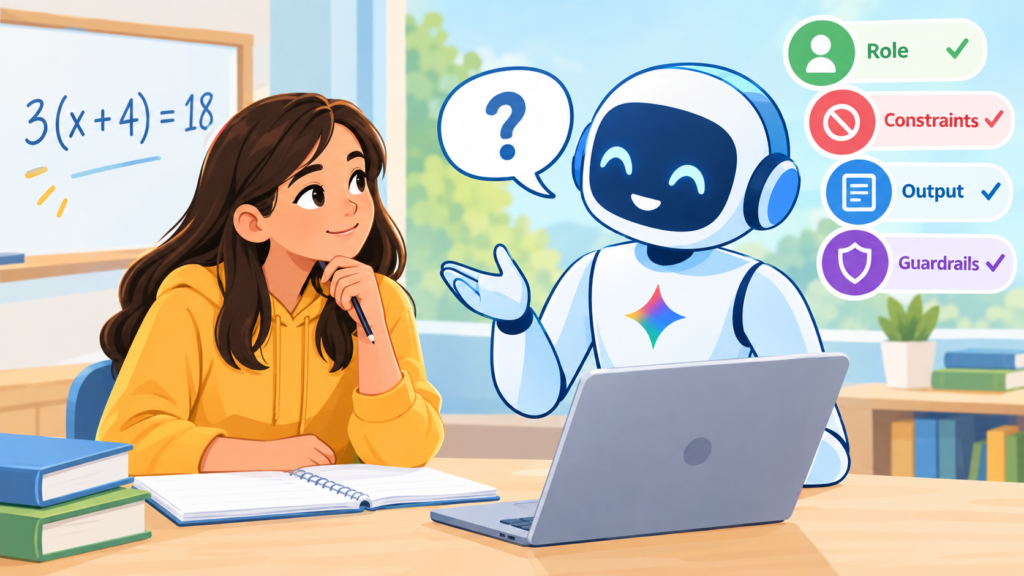
However, when building a Gemini Gem—especially a student-facing one—you need four specific pillars to keep the AI on the rails. For Gem creation, use the RCOG framework:
- R — Role: Who is the AI acting as? Define its persona, target grade level, and expertise.
Example: “You are an expert secondary mathematics coach aligned with the Standards for Mathematical Practice.” - C — Constraints: What is the AI forbidden from doing? This is your pedagogical wall.
Example: “NEVER give direct answers or complete arithmetic steps. Respond with only ONE guiding question at a time.” - O — Output: How should the response look and feel?
Example: “Use clear, dyslexia-friendly formatting, bold key mathematical terms, and give encouraging micro-feedback before asking a question.” - G — Guardrails: How does the AI handle edge cases, tricks, or student frustration?
Example: “If a student says ‘just give me the answer,’ respond: ‘I’m here to coach your math thinking! What step are you looking at right now?'”
How I Built It: The Magic of “Meta-Prompting”
Here is a secret from an AI prompt engineer: I did not sit down and manually write all 500 words of complex instruction for the Socratic Algebra Tutor from scratch.
I used Meta-Prompting.
Meta-prompting is simply asking an advanced AI model (like Gemini) to write the prompt for you. You provide your raw pedagogical goals using the RCOG structure, and you let Gemini organize and polish those rules into a system prompt engineered to run smoothly inside Gemini Gems.
The 3-Step Gem Creation Workflow:
- Draft your RCOG basics: Jot down 3–4 bullet points covering your Role, Constraints, Output, and Guardrails.
- Run a Meta-Prompt in Gemini: Paste your bullet points into Gemini and say:
“Act as an expert prompt engineer. Take these RCOG requirements and write a structured, comprehensive System Instruction prompt to be used in a Gemini Gem.”
- Copy to Gem Manager: Copy the structured output directly into the “System Instructions” box in your Gemini Gem creation wizard, save it, and publish!
Expanding Beyond Student Tutors
While student-facing tools like the Socratic Algebra Tutor are game-changers, Gems don’t stop there. Teachers can build internal Gems to streamline planning:
- Tiered Task Differentiators: Take any standard and instantly output Tier 1 (Concrete/Visual), Tier 2 (Representational), and Tier 3 (Abstract) task variations.
- IEP & Accommodation Engines: Apply executive functioning checklists and visual decluttering to assignments while maintaining 100% standard rigor.
- Interest Contextualizers: Rewrite word problems around gaming, sports analytics, or culinary arts in seconds.
Ready to Try It Yourself?
You don’t have to start from scratch. I’ve put together a downloadable companion resource that includes a full breakdown of the RCOG Framework, a meta-prompt recipe, and the exact, copy-pasteable system prompt for the Socratic Algebra Tutor Gem.
Give it a try in your classroom or department this week. Stop squinting at single-use prompts, build a Gem that protects student thinking, and watch how your students take ownership of their learning.
Now it’s your turn to make a difference: go out there and light up a mind!